This is the full walkthrough of GMTO OS — every module, how they connect, and how your Life Score gets made. Read it straight through once, then keep it as a reference.
GMTO OS runs on one simple cycle, repeated daily: plan your day → live it → score it. Every module feeds that loop. You block time in Schedule, execute tasks from Projects and Today, capture thoughts in Inbox, log training and food — and at night, Reflection turns all of it into a single number out of 100: your Life Score.
Scores build streaks (score 70%+ to keep your fire alive), streaks build XP and levels, and the calendar heatmap turns months of your life into something you can actually see. The system doesn't ask you to be perfect — it asks you to show up, log honestly, and let the number tell the truth.
Day one advice: don't set up everything at once. Add 2–3 real tasks, block tomorrow morning, log one meal, and close your day with Reflection tonight. Your first score will be low. That's your "before" photo — the system starts working when you start living on it.
02 · MODULE
Today — Your Command Center
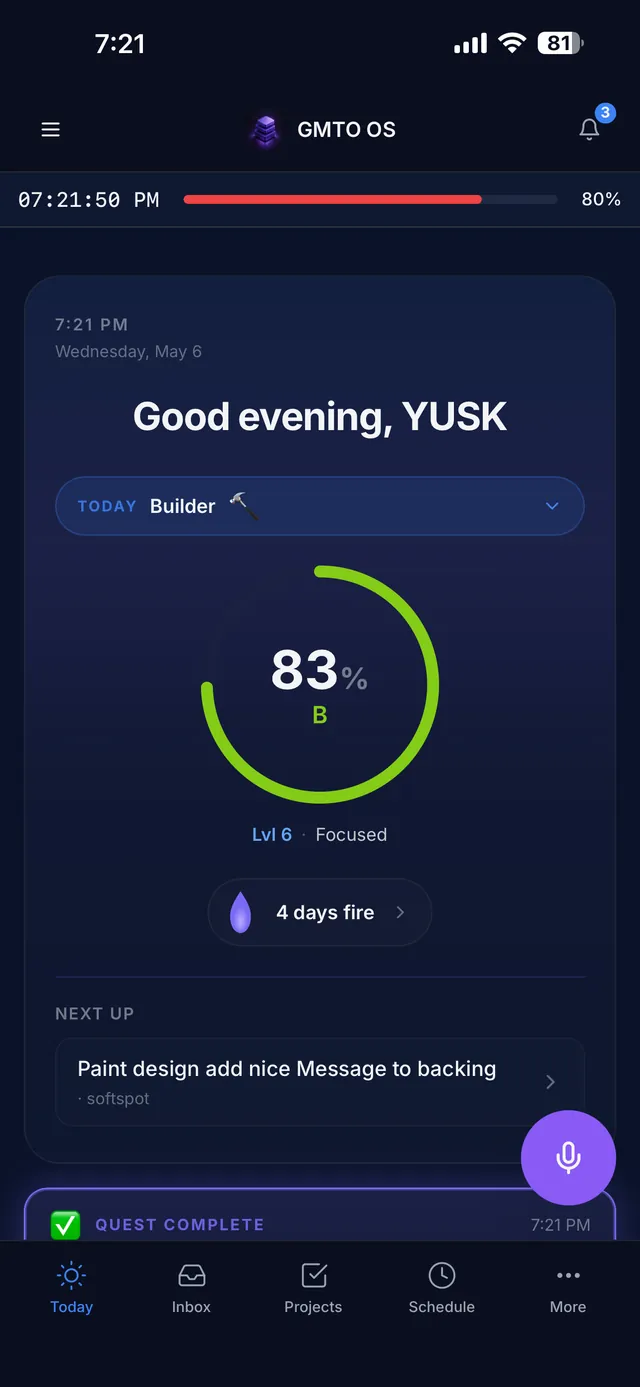
TODAY — SCORE RING · LEVEL · STREAK · NEXT UP
Today is where every morning starts and where the whole system meets. One screen answers three questions: how am I doing, what's next, and what does today demand?
The score ring — your live Life Score for today, with a letter grade. It fills as you execute, log, and reflect.
Persona selector — set today's mode (e.g. Builder 🔨). It frames the day's focus and quest.
Level, XP & streak — your long-game progress. Completing quests and scoring 70%+ days earns XP; the flame counts consecutive days on fire.
Next up — the single task the system wants you to touch next, so you never open the app and wonder where to start.
Today's quest — one focused challenge worth bonus XP (e.g. "Ship a feature today · +50 XP"). Skip it or claim it.
The week strip & widgets — tasks due this week, momentum, today's nutrition at a glance, and your friends' activity feed.
Power move: press ⌘ / (or tap search) from anywhere to search pages, tasks, and projects instantly.
03 · MODULE
Schedule — Time Blocking
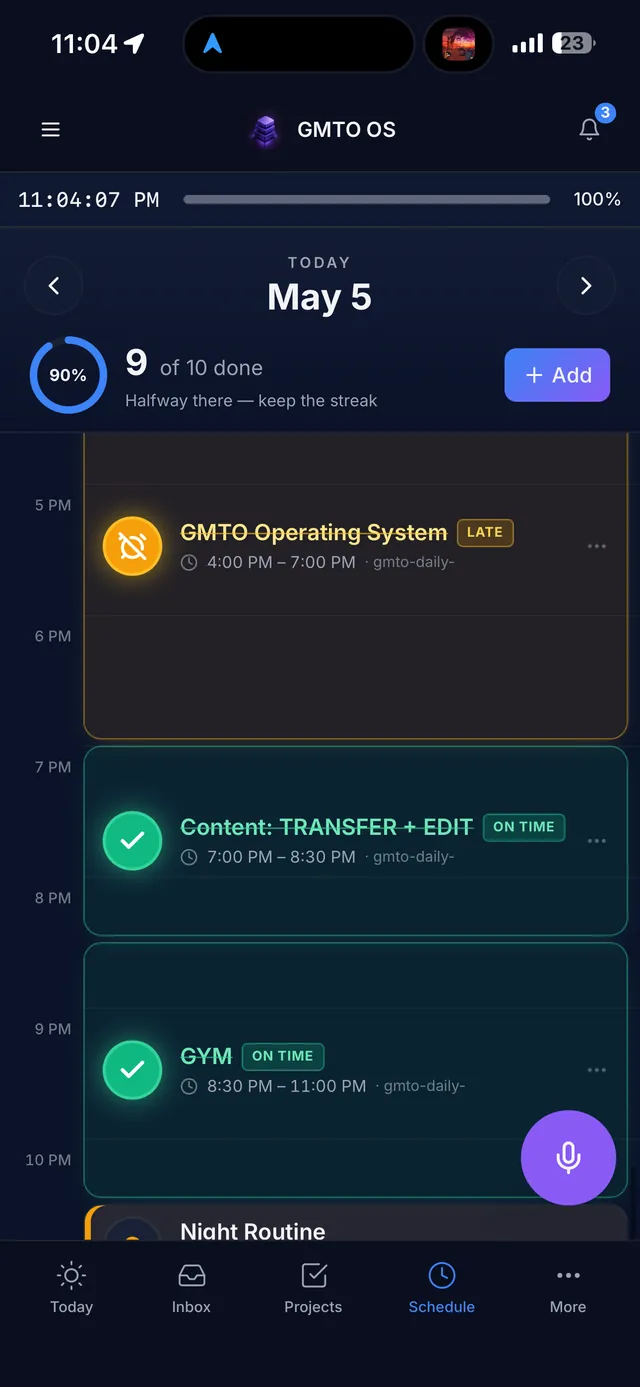
SCHEDULE — TIME BLOCKS TRACKED ON-TIME OR LATE
Schedule is built on one rule the whole system enforces: "Schedule is the Source of Truth." You don't just plan blocks — you're held to them. Every block gets tracked as on-time or late, and hours you leave unlogged cost you points at Reflection.
How to use it
Add events — tap Add Event (or Plan Week for a full layout). Type each block: deep work, meeting, personal, routine, or break.
Drag to adjust — blocks are draggable; rearrange your day as it changes instead of abandoning the plan.
Live it — as blocks pass, they're marked on-time or late. The day bar up top shows time remaining in your day (7 AM – 11 PM window).
Check Time Accountability — the panel shows scheduled vs. available hours and your unlogged time. "Where did your day go?" is a question the app actually answers.
Schedule also holds your weekly goals, a streak goal (30 days), achievements, and time analytics by week or month — so over time you see where your hours actually went, not where you think they went.
04 · MODULE
Projects — Every Venture, One Board
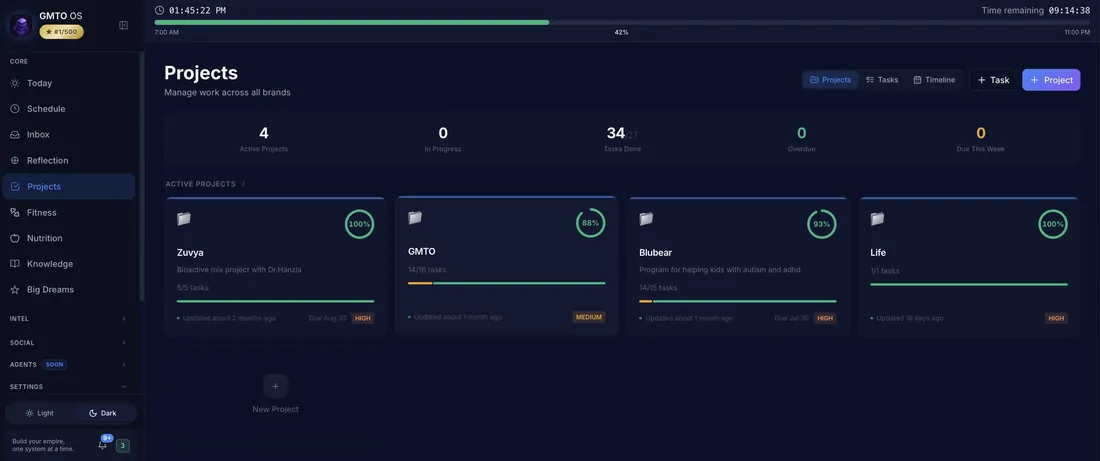
PROJECTS ON DESKTOP — MANAGE WORK ACROSS ALL BRANDS
Projects is where your ventures live — every business, plus a Life project for personal work, each with its own progress ring, task count, priority, and due date. If you run more than one thing, this is the module that stops them from blurring together.
Three views — Projects (cards with completion %), Tasks (everything across all projects), and Timeline.
The stat row — active projects, in progress, tasks done, overdue, and due this week. Your workload in one glance.
Per-project detail — open any project for its tasks, priority (high/medium), due date, and last-updated time.
Feeds Today — tasks you create here surface on the Today screen and the week strip, and completing them feeds your daily execution score.
05 · MODULE
Inbox — Capture & Knowledge
[ SCREENSHOT SLOT ] INBOX — KNOWLEDGE BASE WITH A FEW PAGES CREATED, SHOWING THE PAGES / QUEUE / GRAPH TABS
Inbox is your personal knowledge base and capture point. The rule: get it out of your head and into the system — thoughts, notes, ideas, anything — then sort it later. Capture beats organization.
Pages — your notes, organized under Home. Create a page for anything worth keeping.
Queue — captured items waiting to be processed into pages, tasks, or trash.
Graph — see how your pages connect to each other as your knowledge base grows.
It's scored — Reflection tracks Inbox Discipline: capture at least 3 items a day or lose points. The system literally rewards you for emptying your head.
06 · MODULE
Reflection — Closing Your Day
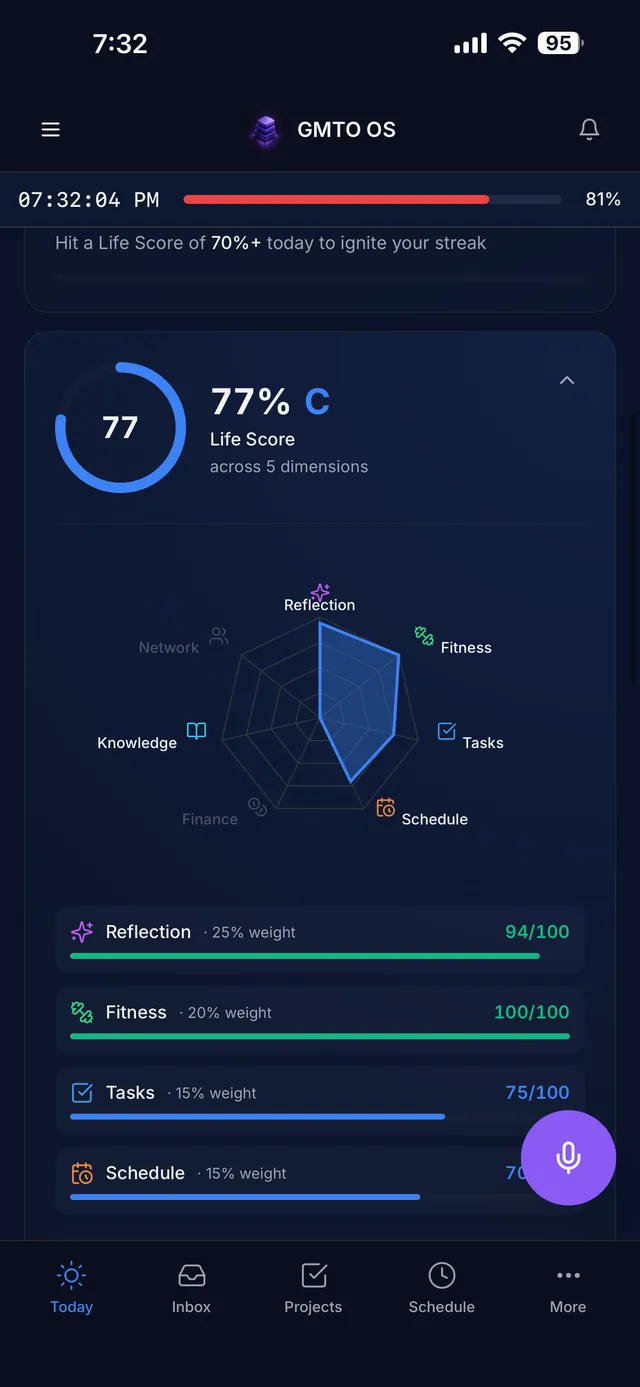
LIFE SCORE — WEIGHTED DIMENSIONS, SCORED DAILY
Reflection is the module that makes GMTO OS different from every tracker you've quit. Each night you Close My Day: the app assembles your daily score from what you actually did, then walks you through honest prompts — what went well, what went bad, what got completed, what's left pending, the day's recap, and who you met.
The daily score breakdown
Component
What it measures
Points
Wins
What you shipped and got done today
/15
Tomorrow
Planning the next day before it starts
/12
Metrics
Logging your numbers honestly
/5
Inbox Discipline
3+ captures today (quick, voice, or pressure)
penalty if missed
Schedule Accountability
Unlogged hours cost you — the schedule is the source of truth
penalty if unlogged
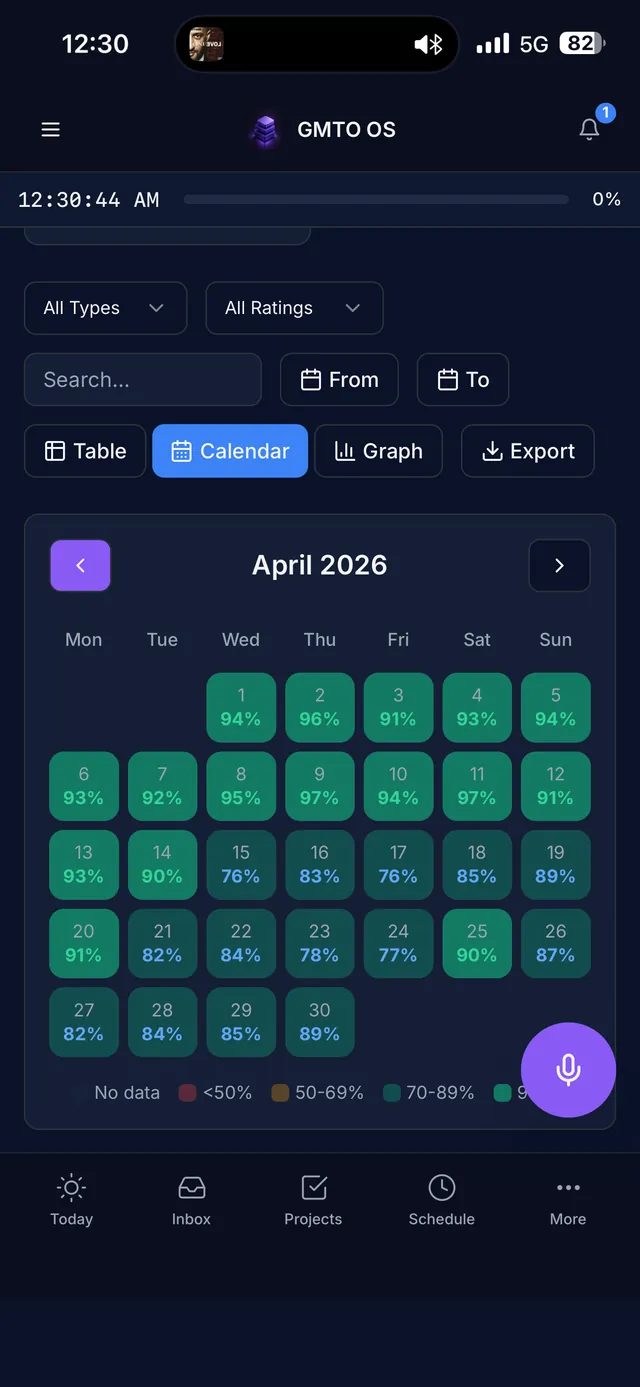
Daily resets at midnight; weekly and monthly progress accumulate on top. Your score history lives in the History tab as a table, a calendar heatmap, or a graph — and it exports.
HISTORY — YOUR MONTH, SCORED DAY BY DAY
The honest part: penalties are real. Skip your captures, leave your day unlogged, and the score says so. That sting is the product working — a score you can't game is the only score worth keeping.
07 · MODULE
Fitness — Training Log
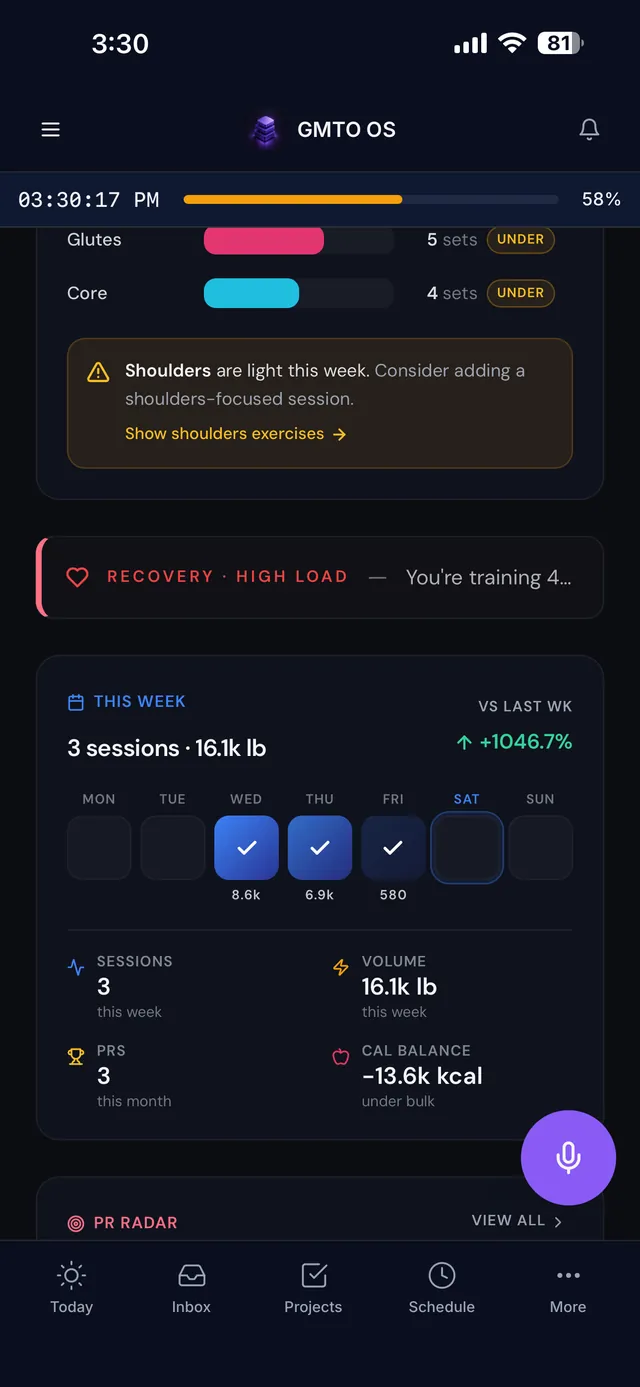
FITNESS — SESSIONS · VOLUME · PRS · RECOVERY
A full training system across five tabs — Dashboard, History, Records, Exercises, Body — built for people who actually lift, with quick capture for everything else.
Routines & sessions — build routines (exercises, sets, estimated time), log readiness, then Start Session to train through it.
Quick capture — one tap logs a run, walk, bike, hike, swim, yoga, stretch, sport, or a custom activity. No friction, no excuse.
Weekly goals — volume, sets, and sessions targets with live progress, plus a vs-last-week comparison.
The watchdogs — muscle-group balance warnings when something falls behind, recovery flags when your load runs high, PR tracking, and calorie balance tied into Nutrition.
08 · MODULE
Nutrition — Fuel Tracking
[ SCREENSHOT SLOT ] NUTRITION — DAY VIEW WITH MACRO RINGS PARTIALLY FILLED AND A MEAL OR TWO LOGGED
Nutrition tracks the day as a story, not a spreadsheet. The Day Narrative up top talks to you like a coach — "Nothing logged yet and it's already 9 PM. Open the day with whatever's easy — log it, even if it's coffee."
Macro rings — calories, protein, carbs, and fat against your daily targets, live.
Meals — breakfast, lunch, dinner, snacks, each one tap to add food.
Water & supplements — quick-add water in one tap (+250ml / +500ml / +1L) and dose-dot tracking for creatine, vitamins, omega-3, whatever you take.
Insights — the app does the math and tells you what to do about it: "You're 130g short on protein and it's already 9 PM. Consider a shake or 100g chicken."
Trends & library — history, trend lines, and a food library that makes repeat logging instant.
09 · MODULE
Finance — Money Command Center
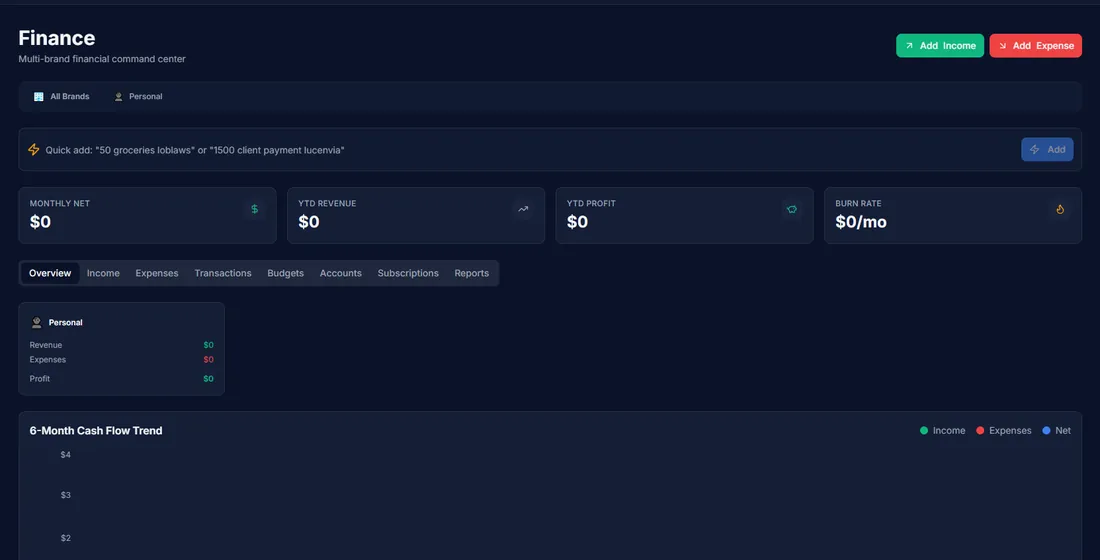
FINANCE — EVERY BUSINESS PLUS PERSONAL, SEPARATED
Finance is a multi-brand money command center: every business you run gets its own unit, plus Personal, all separated and all rolled up. If you juggle ventures, this replaces the spreadsheet graveyard.
The headline row — monthly net, YTD revenue, YTD profit, and burn rate, switchable per brand or across all of them.
Quick add — log income or an expense in seconds, typed in plain language.
The 6-month cash flow trend — income, expenses, and net over time, plus revenue by business unit.
Subscriptions tracking — every recurring charge in one list with a monthly total, so nothing bleeds you quietly.
10 · THE SYSTEM
How the Life Score Works
Everything above feeds one number. Your Life Score is a weighted blend of your active dimensions — Reflection, Fitness, Tasks, Schedule, and more as you activate them — each scored out of 100, each carrying its own weight, combined into a daily score with a letter grade.
The design principle: the score reflects behavior, not intention. Planning counts. Logging counts. Executing counts. Leaving hours unlogged or skipping captures costs you. Over weeks, the calendar heatmap becomes an honest picture of how you actually live — the consistency and the drift, both in color.
Score 70%+ to put your day "on fire" and keep your streak alive. Streaks and quests earn XP, XP earns levels. It's a game — but the only way to win is to actually run your life well, which is the whole point.
Customize it: the dimensions and their weights adapt as you use more of the system — a Customize option in Reflection lets you shape what your score cares about. Your life, your weights.
11 · SUPPORT
Getting Help
Stuck, found a bug, or want a feature? You talk directly to the two founders who build this:
The Discord — fastest. We're in there daily; bugs get fixed in the open and founding member requests shape the roadmap.